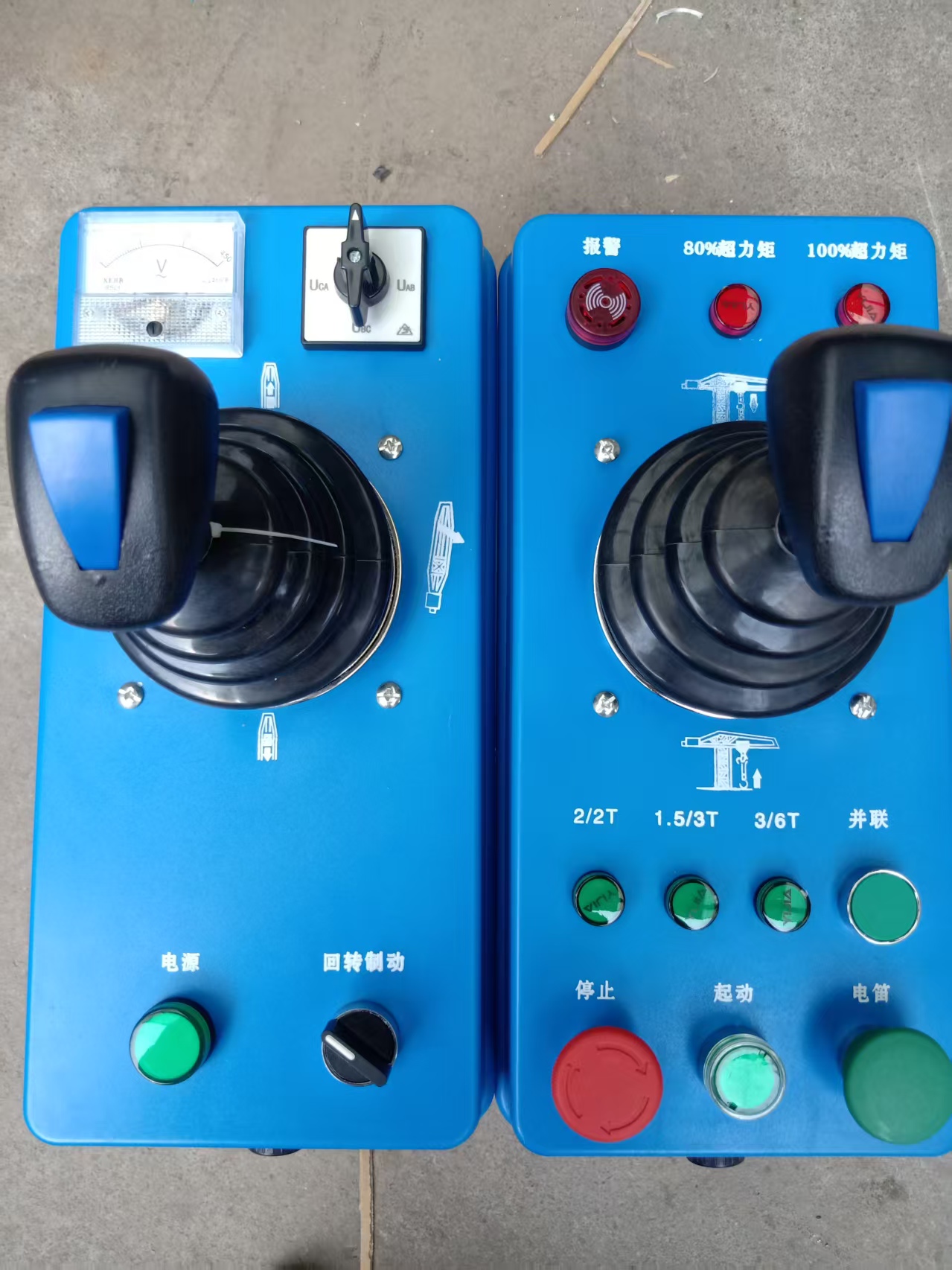
▌ APPLICATION NOTE · OCTOBER 2026 · OPERATOR CONSOLE Operator Console: Controls, Displays and Monitoring Integration The console is the interface between the operator and the machine. It holds the levers that drive hoist, trolley and slew, the buttons and indicators that report state, and increasingly the display of a safety-monitoring system. When it is laid out well, the operator drives and reads without thinking about the layout. When it is laid out badly, every lift costs a little more attention than it should. This note covers the console as a working interface: the controls, the displays, and how a monitoring system should be integrated so that it adds information without adding clutter. The crane and monitoring suppliers define the electrical details; this note explains what the operator needs from the console.
01 CONTROLS THE OPERATOR USES The primary controls are the levers or joysticks for hoist, trolley and slew. They should move smoothly, return positively and be arranged in the pattern the operator expects. Buttons and switches for auxiliary functions should be grouped logically, and the emergency stop should be prominent and reachable. Wear in the levers shows up as play, a sticky movement or a control that does not return to neutral. That is a maintenance issue and a safety issue at the same time, because a lever that does not centre makes precise control harder. ▌ SMOOTH LEVERS Hoist, trolley and slew controls should move smoothly and return positively. ▌ LOGICAL GROUPING Auxiliary controls should be grouped so they are found without looking. ▌ PLAY IS A DEFECT Sticky or loose levers are a maintenance and safety issue. 02 DISPLAYS AND READINGS The console carries the indicators the operator needs to judge a lift: at minimum the load-moment display, and on monitored cranes the readings from the safety-monitoring system such as load, radius, height, slew, wind and tilt. These readings should be visible at a glance, in the operator’s normal line of sight, without blocking the view of the load. A large, bright display is only useful if it is placed correctly. A screen that requires the operator to turn away from the load, or that reflects the window, adds a distraction instead of removing one. ▌ AT A GLANCE Key readings should be visible without turning away from the load. ▌ DO NOT BLOCK THE VIEW Displays must not cover the window or the line of sight to the hook. ▌ GLARE MATTERS A reflective screen becomes a distraction, not an aid. 03 INTEGRATING A MONITORING SYSTEM Where a safety-monitoring system is fitted, its terminal is usually mounted on or beside the console. The integration should be planned: power supply, cable routing, display position and alarm sounder all need to be agreed so the operator gets the information without losing space. The monitoring supplier and the crane supplier should coordinate rather than improvise on site. The aim is one interface, not two. If the operator has to look at one screen for the load chart and another for the monitoring readings, the second screen will often be ignored after the novelty wears off. ▌ PLAN THE INTEGRATION Agree power, cable routing, display position and alarm with both suppliers. ▌ ONE INTERFACE The operator should not have to juggle two separate displays. ▌ DO NOT CROWD THE DESK A console crowded with screens reduces control, not improves it.
04 ALARMS AND WARNINGS Alarms must be audible and distinguishable from the general site noise, and they must mean something. A system that alarms constantly is a system the operator learns to ignore. Thresholds should be configured for the actual crane and site, and the alarm sounder placed where it can be heard over the hoist and the wind. Visual warnings should complement the audible ones, not replace them, because the operator may be looking at the load when an alarm occurs. ▌ AUDIBLE AND DISTINCT Alarms must cut through site noise and be distinguishable. ▌ MEANINGFUL THRESHOLDS Constant alarms train the operator to ignore them. ▌ VISUAL PLUS AUDIBLE The operator may be looking at the load when an alarm sounds. 05 CHECKS AND MAINTENANCE Before each shift, test the levers, buttons and emergency stop, and confirm the displays show sensible readings. Check wiring and connectors for damage, and confirm the console is securely fixed. On monitored cranes, confirm the monitoring terminal is communicating and that the alarm can be triggered in a test. Electrical faults in a console are often intermittent, so a fault that appears once should be recorded and investigated rather than waited out. A control that fails at the wrong moment is more dangerous than one that fails obviously. ▌ TEST EVERY SHIFT Levers, buttons, e-stop and displays are part of the pre-shift check. ▌ CHECK CONNECTIONS Damaged wiring and loose connectors cause intermittent faults. ▌ RECORD INTERMITTENTS A fault that appears once should still be investigated. PROCUREMENT IMPACT ● Specify the console controls and layout against the crane model. ● Agree the monitoring terminal position, power and cable routing before delivery. ● Confirm display brightness and size for outdoor daylight use. ● Specify alarm sounder type and audibility for the site. ● Include lever and switch spares in the maintenance stock. WHAT TO WATCH ● Watch lever play and sticky movement, which reduce control precision. ● Watch display placement and glare, which turn an aid into a distraction. ● Watch for two competing screens instead of one integrated interface. ● Watch alarm thresholds, because constant alarms get ignored. ● Watch intermittent electrical faults and record them. ABOUT ZN Industrial (Shandong Zhinuo) designs and manufactures crane safety monitoring systems, positioning systems and mechanical auxiliary handling equipment for overseas construction, industrial and steel markets. Standards and regulations vary by market — local rules still govern your site. ▌ CONTACT shandongzhinuo@outlook.com +86 176 6371 0314 · en.znaqkj.com SOURCES · crane maker’s manual · monitoring system manual · ISO 12480-1 |
Articles / crane
Operator Console: Controls, Displays and Monitoring Integration
The console is where the crane is driven and watched. This note covers control layout, display placement and how a safety-monitoring system should be integrated without crowding the operator.